Mastering Pinterest Visuals with "How To Make" Canva Templates
Standing out on a visual platform like Pinterest requires more than just a good idea; it demands execution. For content creators, educators, and entrepreneurs, the "How to Make" Pinterest Canva Templates offer a specialized solution designed to bridge the gap between a valuable idea and a high-performing pin. These aren't just generic design assets; they are pre-structured frameworks built to communicate a specific type of value—tutorials, recipes, and DIY projects—immediately to your audience.
The Anatomy of an Effective "How-To" Pin
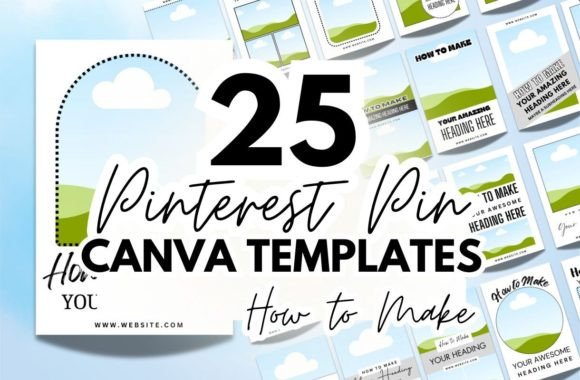
The core strength of these templates lies in their intentional visual hierarchy. On a fast-scrolling feed, you have milliseconds to communicate that your pin contains instructions. The templates achieve this through a prominent, pre-formatted heading that reads "How To Make." This isn't just text; it's a psychological trigger. It promises a clear, actionable outcome, which is a powerful driver for clicks and saves. The surrounding design elements are crafted to support this message without competing with it, using balanced composition and strategic negative space.
Visually, the collection offers a broad personality spectrum. You'll find templates that lean into a minimalist aesthetic with clean sans serif fonts and muted palettes, perfect for tech tutorials or modern lifestyle blogs. Others embrace a more tactile, handwritten or script font style, ideal for crafting, baking, or home décor content that needs a personal, approachable feel. This variety ensures that whether your brand identity is sleek and professional or warm and rustic, you can find a template that aligns with your existing visual language.
Strategic Applications Beyond the Feed
While their primary home is Pinterest, the utility of these "How To Make" Pinterest Canva Templates extends across your entire digital presence. They are exceptionally well-suited for:
- Blog Post Graphics: Create a consistent, branded featured image for every tutorial article, enhancing both your site's professionalism and its pinnability.
- Social Media Stories & Reels: Use the templates as a static frame or a starting point for quick, step-by-step video content on Instagram or Facebook.
- Email Marketing: A compelling "how-to" graphic can increase click-through rates in newsletters, driving traffic back to your site.
- Digital Products: If you sell ebooks, guides, or online courses, these templates can help you design promotional pins that clearly communicate the instructional value of your product.
The practical design of these templates directly influences key metrics. A clear visual hierarchy guides the viewer's eye from the bold "How To Make" promise to the supporting image and your brand name or logo. This clarity improves readability and reduces cognitive load, making it easier for someone to decide to engage. Furthermore, consistent use of a template style contributes to brand recognition. Over time, your audience will start to associate that specific layout or color scheme with your valuable, instructional content, building trust and familiarity.
Practical Guidance for Customization and Brand Fit
Getting started is straightforward, but a thoughtful approach will yield the best results. After duplicating a template in Canva, your first step should be to assess its fit with your project's mood. Is your tutorial on advanced woodworking? A template with a strong, geometric sans serif typeface might convey precision. Is it a recipe for rustic sourdough? A template with a serif font or subtle script accent could evoke tradition and craft.
Customization is where you make it your own. Swap the placeholder images with high-quality, well-lit photos of your actual project or result. Adjust the color palette to match your brand's primary and secondary colors—this is crucial for maintaining a cohesive brand identity across all platforms. Don't overlook the fonts; while the pre-set choices are strong, you can often pair them with a complementary font from your brand's style guide. For instance, pair a bold display font heading with a clean, readable sans serif for any sub-text.
Remember, the goal is clarity. Ensure there is enough contrast between text and background colors for easy reading on mobile devices. Keep any additional text brief and to the point—the image and the "How To Make" header do most of the persuasive work. By treating these Canva templates as a flexible starting point rather than a rigid final product, you leverage professional design principles while infusing your unique creative voice, resulting in pins that are both eye-catching and authentically yours.